Overview
What is the Slices AI infrastructure?
The Slices AI infrastructure is a distributed system for running jobs in GPU-enabled Docker containers. The Slices AI infrastructure consists of a set of heterogeneous clusters, each with their own characteristics (GPU model, CPU speed, memory, bus speed, …), allowing you to select the most appropriate hardware. Each job runs isolated within a Docker container with dedicated CPUs, GPUs and memory for maximum performance.
Users submit a job definition to the Slices AI infrastructure controller via a CLI or Web-interface. The job definition contains a reference to hardware being requested, the Docker image to be used, the command to be executed, the storage to be mounted, etc. The Slices AI infrastructure controller will then schedule this job as soon as possible on one of the appropriate slaves. Typically execution is instantaneous, but a job can be queued during busy periods.
As the clusters are geographically distributed, the storage options vary per cluster. Typically, there is one project storage per geographical location, which is shared between all clusters in that location. There is also an S3-compatible object storage which is mirrored across locations, which allows for fast access to large datasets from all clusters.
Tip

Do you want to get started quickly with using the Slices AI infrastructure? Our JupyterHub-instance allows you to run an interactive Jupyter notebook-session with your choice of hardware.
Once you’ve prepared your experiment you can submit your long-running non-interactive computations directly as jobs on the Slices AI infrastructure.
The Slices AI infrastructure Clusters
The Slices AI infrastructure consists of a set of heterogeneous clusters which each contain one or more slaves (=bare metal servers). Within one cluster all slaves have the same characteristics in terms of GPU model, CPU speed, memory, bus speed, etc.
Example cluster configurations include:
3 slaves with 11 nVidia GeForce GTX 1080 Ti GPUs, 32 1.8Ghz vCPU cores with 250GB RAM.
1 nVidia HGX-2 with 16 nVidia Tesla V100 GPUs, 96 2.7Ghz vCPU cores with 1.5TB RAM.
1 slave with 1 nVidia GeForce RTX 2080 Ti GPU, 12 vGPU cores with 32GB RAM.
An up-to-date overview with the corresponding cluster-id’s can be found at the
live overview or via the slices ai clusters command.
The Slices AI infrastructure User Interfaces
Web Interface
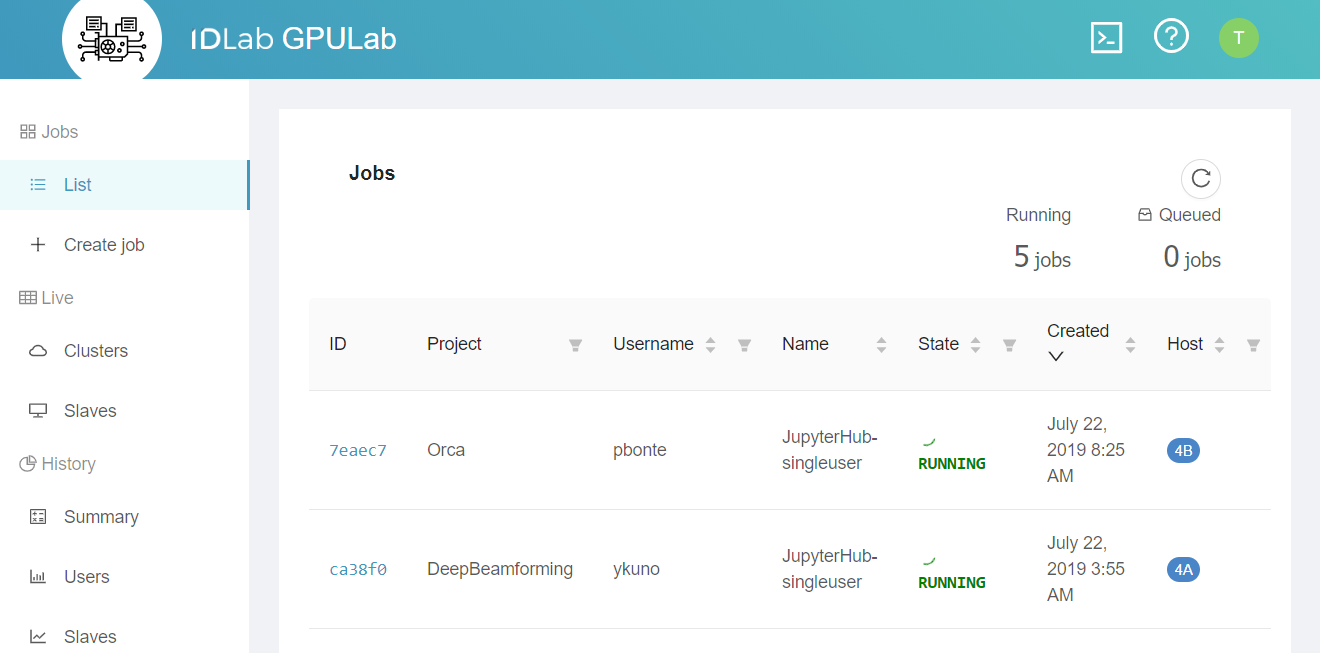
You can use most of the Slices AI infrastructure functionality directly from the Slices AI infrastructure Web Interface
Most users use this web interface to monitor their jobs, but they use the CLI to submit them.
JupyterHub
The Slices AI infrastructure provides a JupyterHub instance for easy interactive use. It lets you launch a Jupyter notebook server with a single click — choosing your GPU, memory, and Docker image from a web form — without writing a job definition or using the CLI.
Command Line Interface
The Slices AI infrastructure offers an easy to use CLI interface. For most users this is the preferred way for submitting their jobs.
The CLI also allows you to retrieve the logs of a job, get console access to the running Docker container, etc. Use the
help-command for more information:
❯ slices ai

 Usage: slices ai [OPTIONS] COMMAND [ARGS]...

 AI Infrastructure Service Commands.

╭─ Options ────────────────────────────────────────────────────────────────────────────────────────────────────────────────────────────────────╮
│ --site,--site-id          TEXT  AI Infrastructure Service site ID. [env var: SLICES_AI_SITE, SLICES_AI_SITE_ID] [default: be-gent1]          │
│ --help            -h            Show this message and exit.                                                                                  │
╰──────────────────────────────────────────────────────────────────────────────────────────────────────────────────────────────────────────────╯
╭─ Auxiliary commands ─────────────────────────────────────────────────────────────────────────────────────────────────────────────────────────╮
│ wait      Wait until the requested status has been reached (or can never be reached).                                                        │
│ modify    Change maxDuration, minDuration or notAfter of a job.                                                                              │
│ debug     Show Internal Job debug logs.                                                                                                      │
╰──────────────────────────────────────────────────────────────────────────────────────────────────────────────────────────────────────────────╯
╭─ Lifecycle commands ─────────────────────────────────────────────────────────────────────────────────────────────────────────────────────────╮
│ submit    Submit a job described in a file.                                                                                                  │
│ cancel    Cancel a job.                                                                                                                      │
│ rm        Delete a job.                                                                                                                      │
│ halt      Halt a job. Halted jobs may be automatically re-QUEUED later.                                                                      │
│ hold      Hold a QUEUED job, preventing it from running.                                                                                     │
│ requeue   Requeue/Release a held job, QUEUEing it, so it waits to run.                                                                       │
╰──────────────────────────────────────────────────────────────────────────────────────────────────────────────────────────────────────────────╯
╭─ Information commands ───────────────────────────────────────────────────────────────────────────────────────────────────────────────────────╮
│ clusters  Show available clusters and their resources.                                                                                       │
│ list      List your jobs.                                                                                                                    │
╰──────────────────────────────────────────────────────────────────────────────────────────────────────────────────────────────────────────────╯
╭─ Job interaction commands ───────────────────────────────────────────────────────────────────────────────────────────────────────────────────╮
│ show      Show Job Details.                                                                                                                  │
│ output    Show Job output.                                                                                                                   │
│ ssh       Connect to a job using SSH.                                                                                                        │
│ sftp      Transfer files to/from a job using SFTP.                                                                                           │
╰──────────────────────────────────────────────────────────────────────────────────────────────────────────────────────────────────────────────╯
The Slices AI infrastructure API
For complex scenarios, you can script the CLI. If this is not enough, you can directly use the Slices AI infrastructure API.